SIP TLS & SRTP: The Complete Guide to Encrypted Voice Communications
Everything you need to know about encrypting SIP voice traffic. From understanding the protocols and meeting compliance requirements (HIPAA, CPNI, PCI-DSS) to configuring Asterisk PJSIP with TLS and SRTP for IPComms.
Standard SIP calls travel over the internet in plain text. Every SIP INVITE message, every DTMF tone, every spoken word can be captured by anyone with access to the network path between your PBX and your SIP trunk provider. This is not a theoretical risk — it is a practical reality that organizations face daily.
The Cost of Unencrypted VoIP
IBM's Cost of a Data Breach Report puts the average breach cost at $4.88 million. For healthcare organizations, that figure rises to $9.77 million. Voice communications that carry sensitive data are subject to the same regulatory scrutiny as email and file transfers.
Without encryption, an attacker positioned on the network path can:
Eavesdrop on conversations — Capture and reconstruct full audio from RTP packets using freely available tools like Wireshark
Steal SIP credentials — Harvest usernames and digest authentication hashes from SIP REGISTER and INVITE messages
Intercept DTMF tones — Capture credit card numbers, PINs, and access codes entered via phone keypad
Launch man-in-the-middle attacks — Modify SIP headers to redirect calls, inject audio, or impersonate callers
Commit toll fraud — Use stolen credentials to make unauthorized calls through your trunk
Encrypts RTP audio streams: the actual spoken words, DTMF tones, fax data, and any media transmitted during the call.
AES-128 counter mode encryption
Key exchange via SDES or DTLS-SRTP
Protects what is being said
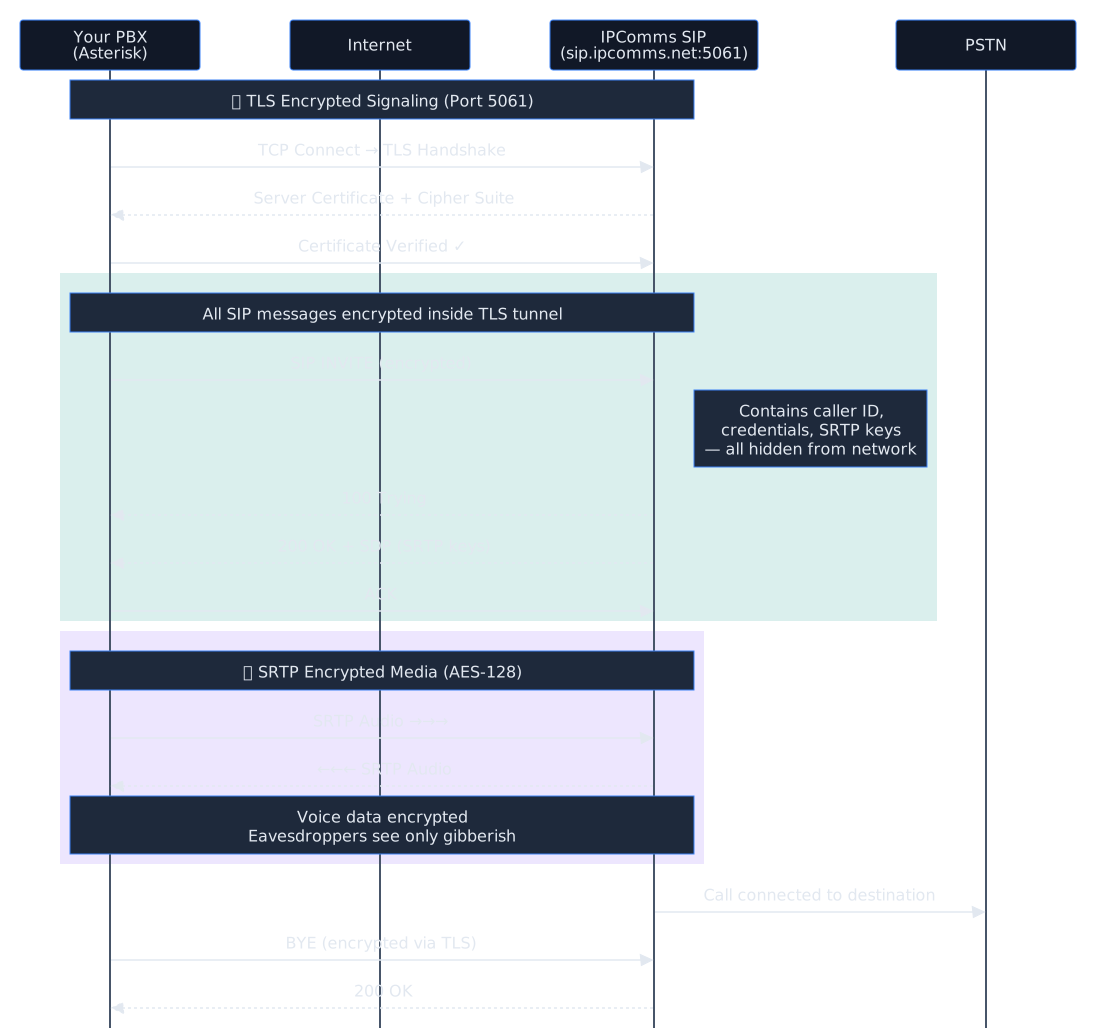
Encrypted SIP Call Flow
1
Your PBX initiates TLS handshake
TCP connection to IPComms on port 5061 → TLS certificate exchange → encrypted tunnel established
2
SIP INVITE sent through TLS tunnel
Call setup, authentication, and SDP (with SRTP keys) are all encrypted inside the TLS connection
3
SRTP keys exchanged via encrypted SDP
SDES crypto attributes are negotiated inside the TLS-protected SIP signaling — keys never travel in plain text
4
Audio streams encrypted with SRTP
All voice data encrypted with AES-128 — eavesdroppers see only encrypted UDP packets
5
Call completed — fully encrypted
BYE message sent via TLS, SRTP streams terminated — no data was exposed at any point
Full Encrypted Call Flow Diagram
How SIP TLS Works
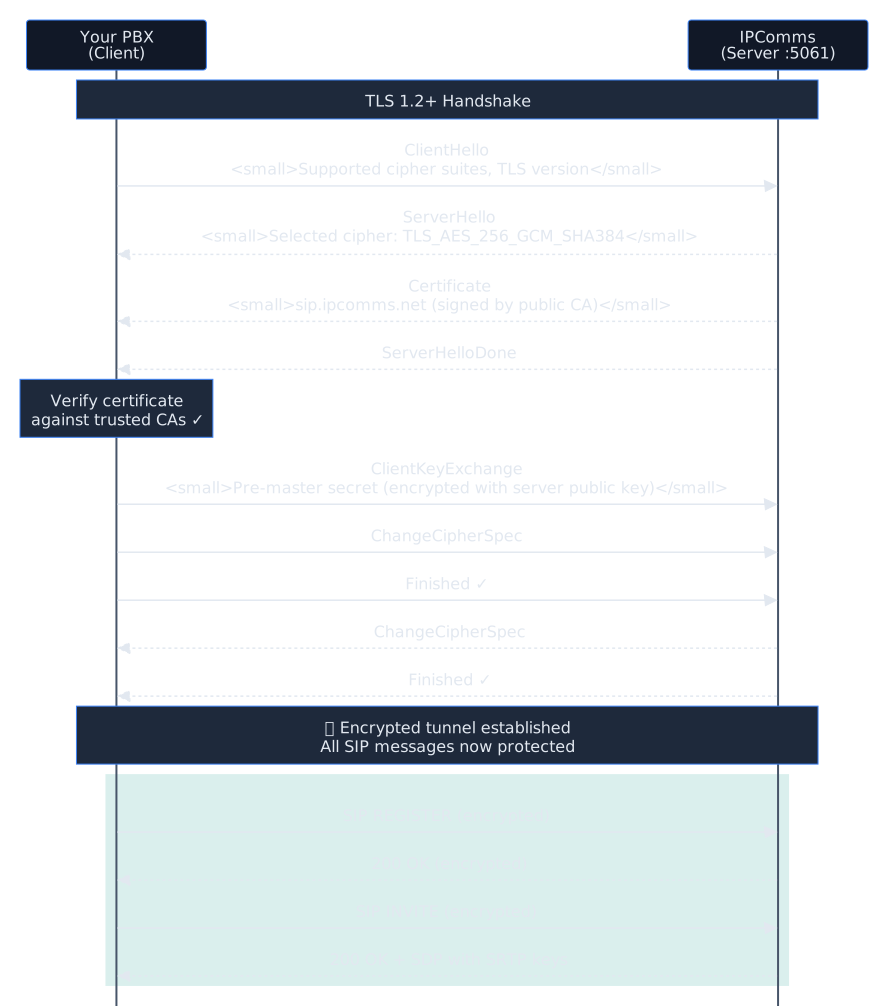
SIP over TLS (sometimes called SIPS) works by wrapping the standard SIP protocol inside a TLS-encrypted TCP connection, using port 5061 instead of the standard port 5060. The process follows the standard TLS handshake:
TCP connection: Your PBX opens a TCP connection to the SIP provider on port 5061
TLS handshake: Client and server exchange certificates and negotiate cipher suites (e.g., TLS_AES_256_GCM_SHA384)
Certificate validation: Your PBX verifies the server certificate against trusted Certificate Authorities. Optionally, the server can also verify your client certificate (mutual TLS)
Encrypted channel: All subsequent SIP messages flow through the encrypted tunnel — REGISTER, INVITE, BYE, and everything in between
Protocol Comparison
Feature
SIP over UDP
SIP over TCP
SIP over TLS
Default Port
5060
5060
5061
Signaling Encryption
None
None
AES-256
Auth Protection
MD5 hash only
MD5 hash only
Fully encrypted
Media Encryption
None (RTP)
None (RTP)
Requires SRTP
Certificate Required
No
No
Yes
Man-in-the-Middle
Vulnerable
Vulnerable
Protected
TLS Handshake Sequence
Building this? Your PBX will need a number
Find a phone number for your trunk
Local numbers $1.50 a month, toll-free $2.00, $1.00 one-time setup. Pick one here and it carries into signup.
Enter an area code, or wait a moment for numbers near you.
SRTP (Secure Real-time Transport Protocol, defined in RFC 3711) encrypts the media portion of a VoIP call. While TLS protects the signaling, SRTP protects the actual audio content — the spoken words.
Key Exchange Methods
SDES (Session Description Protocol Security)
SRTP keys are exchanged in the SDP body of SIP messages (the a=crypto attribute). This is the most common method for SIP trunking and is what IPComms supports. Requires TLS to be secure — without TLS, the keys are sent in plain text.
DTLS-SRTP
Key exchange happens directly between media endpoints using DTLS (Datagram TLS). More secure since keys never appear in SIP signaling, but less commonly supported by SIP trunk providers. Used primarily in WebRTC.
Why TLS Alone Is Not Enough
SIP signaling and media travel on separate streams. TLS encrypts the SIP signaling (the control channel), but the actual audio data flows as RTP packets on different UDP ports (typically 10000–20000). Without SRTP, these audio packets are unencrypted even when signaling is protected by TLS.
Think of it this way: TLS encrypts the envelope (who is calling whom, from where), while SRTP encrypts the letter inside (what is being said). You need both for complete protection.
Compliance Use Cases
Voice encryption is not just a security best practice — for many industries, it is a regulatory requirement. Here are the major compliance frameworks that mandate or strongly recommend TLS/SRTP for voice communications.
HIPAA — Healthcare
The Health Insurance Portability and Accountability Act requires covered entities to implement technical safeguards for electronic Protected Health Information (ePHI). Voice calls discussing patient information, telehealth sessions, and recorded calls containing health data all fall under ePHI protection requirements.
HIPAA Security Rule §164.312(e)(1): Implement technical security measures to guard against unauthorized access to ePHI being transmitted over electronic communications networks
Encryption is “addressable” but failing to implement it requires documented justification and equivalent alternative measures
Telehealth calls discussing diagnoses, prescriptions, or treatment plans must be encrypted in transit
CPNI — Telecommunications
Customer Proprietary Network Information (CPNI) rules under FCC 47 CFR Part 64 require telecommunications carriers to protect call detail records and customer usage data. SIP trunk providers and their customers share responsibility for protecting this data.
Call Detail Records (CDRs) transmitted in SIP signaling headers are CPNI data
Carrier obligations: Protect against unauthorized access to calling patterns, numbers called, and call duration
TLS prevents interception of CDR data embedded in SIP INVITE and BYE messages
PCI-DSS — Payment Card Industry
PCI-DSS Requirement 4 mandates encryption of cardholder data in transit over open, public networks. Any organization that captures credit card numbers over the phone — whether through agent-assisted calls or IVR keypad entry — must encrypt those voice streams.
Requirement 4.1: Use strong cryptography and security protocols to safeguard sensitive cardholder data during transmission over open, public networks
DTMF tones carrying credit card numbers in IVR systems travel as RTP — SRTP encryption is required
Call recordings containing card numbers must also be encrypted at rest and in transit
SOX / Financial Services
Sarbanes-Oxley and financial regulations require protection of material non-public information. Encrypted voice lines prevent interception of earnings discussions, M&A conversations, and insider information that could enable securities fraud.
Legal / Attorney-Client Privilege
Attorney-client privilege requires reasonable measures to maintain confidentiality. ABA Formal Opinion 477R states lawyers must make “reasonable efforts” to prevent unauthorized access to communications. Unencrypted VoIP may not meet this standard.
Do You Need Voice Encryption?
Compliance Requirements Matrix
Framework
TLS Required?
SRTP Required?
Audit Trail?
Recording Encryption?
HIPAA
Addressable
Addressable
Yes
Yes
CPNI
Recommended
N/A
Yes
N/A
PCI-DSS
Required
Required
Yes
Yes
SOX
Recommended
Recommended
Yes
Yes
Legal/Privilege
Recommended
Recommended
Varies
If applicable
TLS/SRTP vs VPN: Which Do You Need?
Both TLS/SRTP and VPN tunnels encrypt voice traffic, but they operate at different layers and serve different purposes. Here is how they compare.
Feature
TLS/SRTP
VPN (IPsec/WireGuard)
Encryption scope
Per-call, per-stream
All traffic in tunnel
Network layer
Application (L7)
Network (L3)
NAT traversal
Native SIP NAT handling
Can complicate NAT
Latency overhead
Minimal
Additional encapsulation
Provider support
Standard SIP feature
Requires provider cooperation
Multi-site
Works anywhere
Needs VPN per site
Configuration
PBX settings only
Network infrastructure
Configuring Asterisk PJSIP with TLS & SRTP for IPComms
This section walks you through configuring Asterisk 18+ with PJSIP to connect to IPComms using TLS for signaling and SRTP for media encryption.
Network Architecture
Step 1: Generate or Install TLS Certificates
You need a certificate and private key for Asterisk’s TLS transport. For production, use Let’s Encrypt:
Option A: Let’s Encrypt (production):
# Install certbot if not already present
apt install certbot
# Generate certificate for your PBX hostname
certbot certonly --standalone -d pbx.yourdomain.com
# Create symlinks for Asterisk
mkdir -p /etc/asterisk/keys
ln -s /etc/letsencrypt/live/pbx.yourdomain.com/fullchain.pem \
    /etc/asterisk/keys/asterisk.crt
ln -s /etc/letsencrypt/live/pbx.yourdomain.com/privkey.pem \
    /etc/asterisk/keys/asterisk.key
# Download the ISRG Root X1 CA bundle
wget -O /etc/asterisk/keys/ca.crt \
    https://letsencrypt.org/certs/isrgrootx1.pem
Option B: Self-signed (testing only):
# Generate self-signed certificate
openssl req -new -x509 -days 365 -nodes \
    -out /etc/asterisk/keys/asterisk.crt \
    -keyout /etc/asterisk/keys/asterisk.key \
    -subj "/CN=pbx.yourdomain.com"
# Copy cert as CA for self-signed
cp /etc/asterisk/keys/asterisk.crt /etc/asterisk/keys/ca.crt
# Set permissions
chown asterisk:asterisk /etc/asterisk/keys/*
chmod 640 /etc/asterisk/keys/*
Step 2: Configure PJSIP TLS Transport
Add a TLS transport to your /etc/asterisk/pjsip.conf:
; ============================================
; TLS Transport for encrypted SIP signaling
; ============================================
[transport-tls]
type=transport
protocol=tls
bind=0.0.0.0:5061
cert_file=/etc/asterisk/keys/asterisk.crt
priv_key_file=/etc/asterisk/keys/asterisk.key
ca_list_file=/etc/asterisk/keys/ca.crt
method=tlsv1_2
; Require TLS 1.2 minimum - do not use tlsv1 or sslv3
Step 3: Configure IPComms Trunk with TLS/SRTP
Configure the IPComms trunk endpoint, AOR, and authentication using the TLS transport:
For end-to-end encryption, your internal phones should also use TLS/SRTP. Add these settings to your extension endpoints:
; Secure endpoint template for internal phones
[endpoint-secure](!)
type=endpoint
transport=transport-tls
context=from-internal
disallow=all
allow=ulaw
allow=alaw
direct_media=no
media_encryption=sdes
media_encryption_optimistic=no
; Set to no to REQUIRE SRTP from all phones
; Example extension using secure template
[1001](endpoint-secure)
auth=1001-auth
aors=1001
callerid="John Smith" <1001>
[1001-auth]
type=auth
auth_type=userpass
username=1001
password=STRONG_RANDOM_PASSWORD_HERE
[1001]
type=aor
max_contacts=1
remove_existing=yes
Step 5: Dialplan Configuration
Configure your dialplan in /etc/asterisk/extensions.conf to route calls through the encrypted trunk:
; ============================================
; Outbound calls via encrypted IPComms trunk
; ============================================
[from-internal]
; US/Canada domestic - 10 or 11 digit
exten => _1NXXNXXXXXX,1,Dial(PJSIP/${EXTEN}@ipcomms,,b(add-headers^${EXTEN}^1))
exten => _NXXNXXXXXX,1,Dial(PJSIP/1${EXTEN}@ipcomms,,b(add-headers^1${EXTEN}^1))
; International
exten => _011.,1,Dial(PJSIP/${EXTEN}@ipcomms)
; Emergency
exten => 911,1,Dial(PJSIP/911@ipcomms)
exten => 933,1,Dial(PJSIP/933@ipcomms)
; ============================================
; Inbound calls from IPComms
; ============================================
[from-ipcomms]
exten => _X.,1,Goto(inbound-handler,${EXTEN},1)
[inbound-handler]
exten => _X.,1,Answer()
 same => n,Dial(PJSIP/1001&PJSIP/1002,30)
 same => n,Voicemail(1001,u)
 same => n,Hangup()
Step 6: Reload and Verify
Apply the configuration and verify TLS is working:
# Reload PJSIP configuration
asterisk -rx "module reload res_pjsip.so"
# Verify TLS transport is listening
asterisk -rx "pjsip show transports"
# Check that port 5061 is open
ss -tlnp | grep 5061
# Enable SIP debug logging to verify TLS handshake
asterisk -rx "pjsip set logger on"
# Make a test call, then check the logs for:
# - "Transport: TLS" in SIP messages
# - "a=crypto:" lines in SDP (SRTP negotiation)
Testing Your Encrypted Connection
Verify TLS is Active
# Check that Asterisk is listening on TLS port
asterisk -rx "pjsip show transports"
# Look for: transport-tls  tls  0.0.0.0:5061
# Verify TLS connection to IPComms using openssl
openssl s_client -connect sip.ipcomms.net:5061 -brief
# Should show: CONNECTION ESTABLISHED
# Protocol: TLSv1.2 (or TLSv1.3)
# Check active channels for encryption
asterisk -rx "pjsip show channelstats"
Verify SRTP is Active
# Enable RTP debug during a test call
asterisk -rx "rtp set debug on"
# Make a call and look in the logs for:
# "SRTP" and "a=crypto:1 AES_CM_128_HMAC_SHA1_80"
# in the SDP negotiation
# Disable RTP debug when done
asterisk -rx "rtp set debug off"
Wireshark Verification
For thorough verification, capture packets with tcpdump and analyze in Wireshark:
# Capture SIP traffic on the TLS port
tcpdump -i eth0 -w /tmp/sip-tls-test.pcap port 5061
# Open in Wireshark - you should see:
# - TLS handshake packets (Client Hello, Server Hello)
# - Application Data packets (encrypted SIP - unreadable)
# - NO readable SIP INVITE or REGISTER messages
Common Issues & Troubleshooting
Certificate Errors / TLS Handshake Failure
If you see SSL routines:ssl3_get_server_certificate:certificate verify failed in the Asterisk log, your CA bundle is missing or incorrect. Ensure ca_list_file points to a valid CA bundle that includes the root CA for your provider’s certificate. For Let’s Encrypt, use the ISRG Root X1 certificate.
Implementation Checklist
Use this checklist to ensure your SIP TLS/SRTP implementation is complete:
Certificates
☐TLS certificate installed and readable by Asterisk
☐CA bundle configured for certificate chain validation
☐Certificate auto-renewal configured (Let’s Encrypt)
PJSIP Configuration
☐TLS transport configured on port 5061
☐TLS method set to tlsv1_2 (minimum)
☐Trunk endpoint using transport=transport-tls
☐media_encryption=sdes enabled on trunk
☐AOR using sips: URI scheme for TLS enforcement
Internal Phones
☐Extension endpoints configured with SRTP
☐IP phones/softphones configured for TLS on port 5061
Network & Firewall
☐Firewall allows outbound TCP 5061 to SIP provider
☐RTP port range (10000–20000) open for SRTP
☐NAT settings configured if behind firewall
Verification
☐Test call placed successfully over TLS/SRTP
☐SIP logger confirms TLS transport in use
☐RTP debug confirms SRTP negotiation
☐Wireshark shows encrypted (unreadable) SIP traffic
☐Two-way audio confirmed on encrypted calls
Stop worrying about SIP trunk capacity. We have you covered.
SIP trunking from a US carrier since 2002: $0.009 per minute inbound, $0.010 outbound, numbers from $1.50 a month, $0 per channel, no contracts.