
Why Voice Encryption Matters in 2026
Standard SIP calls travel over the internet in plain text. Every SIP INVITE message, every DTMF tone, every spoken word can be captured by anyone with access to the network path between your PBX and your SIP trunk provider. This is not a theoretical risk — it is a practical reality that organizations face daily.
The Cost of Unencrypted VoIP
IBM's Cost of a Data Breach Report puts the average breach cost at $4.88 million. For healthcare organizations, that figure rises to $9.77 million. Voice communications that carry sensitive data are subject to the same regulatory scrutiny as email and file transfers.
Without encryption, an attacker positioned on the network path can:
- Eavesdrop on conversations — Capture and reconstruct full audio from RTP packets using freely available tools like Wireshark
- Steal SIP credentials — Harvest usernames and digest authentication hashes from SIP REGISTER and INVITE messages
- Intercept DTMF tones — Capture credit card numbers, PINs, and access codes entered via phone keypad
- Launch man-in-the-middle attacks — Modify SIP headers to redirect calls, inject audio, or impersonate callers
- Commit toll fraud — Use stolen credentials to make unauthorized calls through your trunk
What an Attacker Sees
Unencrypted SIP (Port 5060)
INVITE sip:+18005551234@sip.ipcomms.net
From: "John Smith" <sip:1001@pbx.acme.com>
To: <sip:+18005551234@sip.ipcomms.net>
Authorization: Digest username="acme_trunk",
  response="a1b2c3d4e5f6..."
Contact: <sip:1001@203.0.113.50>
Caller ID, destination, credentials, and IP addresses all visible in plain text
Encrypted SIP (TLS Port 5061)
17 03 03 00 8a 5c 2f 91 a3 b7 4e
f8 22 d1 0c 6b 83 47 a9 e5 1f 3c
90 bb 14 72 d8 6e c4 55 08 af 3d
7b e6 19 50 c1 8f 2a 94 dd 63 07
b5 48 fc 76 e2 3b a0 9c 1d 58 ...
All signaling data encrypted — attacker sees only gibberish
Encrypted vs Unencrypted: Side by Side

Understanding SIP TLS vs SRTP
A SIP phone call involves two distinct data streams, each requiring its own encryption layer. Encrypting only one leaves the other exposed.
TLS — Signaling Encryption
Encrypts SIP messages: INVITE, REGISTER, BYE, authentication credentials, caller ID, and call routing information.
- Port 5061 (default for SIP over TLS)
- Certificate-based authentication
- Protects who is calling whom
SRTP — Media Encryption
Encrypts RTP audio streams: the actual spoken words, DTMF tones, fax data, and any media transmitted during the call.
- AES-128 counter mode encryption
- Key exchange via SDES or DTLS-SRTP
- Protects what is being said
Both Are Required: TLS without SRTP protects signaling but leaves your audio exposed. SRTP without TLS encrypts audio but leaks the SRTP keys in the SIP signaling (SDES keys are sent in the SDP body). For true end-to-end encryption, you must enable both.
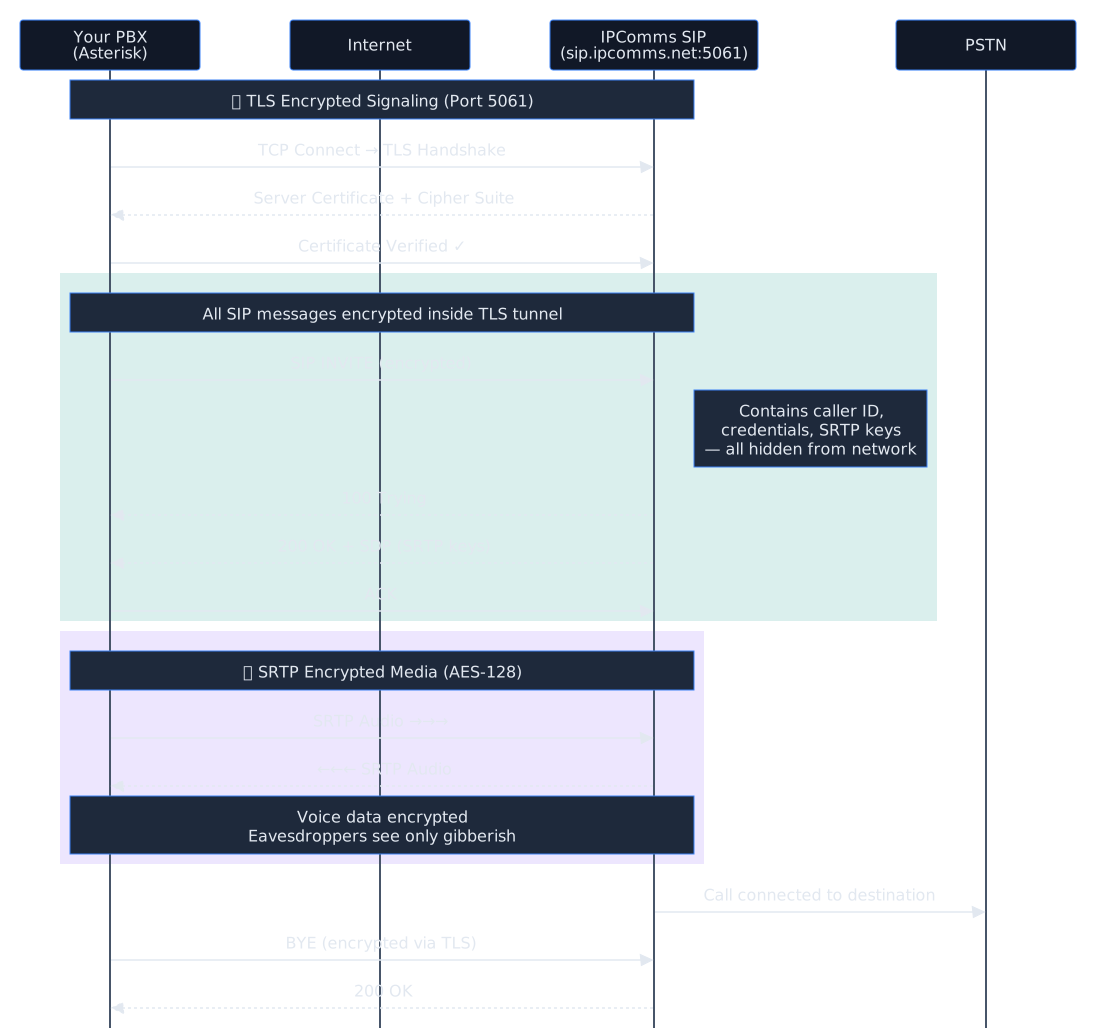
Encrypted SIP Call Flow
Your PBX initiates TLS handshake
TCP connection to IPComms on port 5061 → TLS certificate exchange → encrypted tunnel established
SIP INVITE sent through TLS tunnel
Call setup, authentication, and SDP (with SRTP keys) are all encrypted inside the TLS connection
SRTP keys exchanged via encrypted SDP
SDES crypto attributes are negotiated inside the TLS-protected SIP signaling — keys never travel in plain text
Audio streams encrypted with SRTP
All voice data encrypted with AES-128 — eavesdroppers see only encrypted UDP packets
Call completed — fully encrypted
BYE message sent via TLS, SRTP streams terminated — no data was exposed at any point
Full Encrypted Call Flow Diagram
How SIP TLS Works
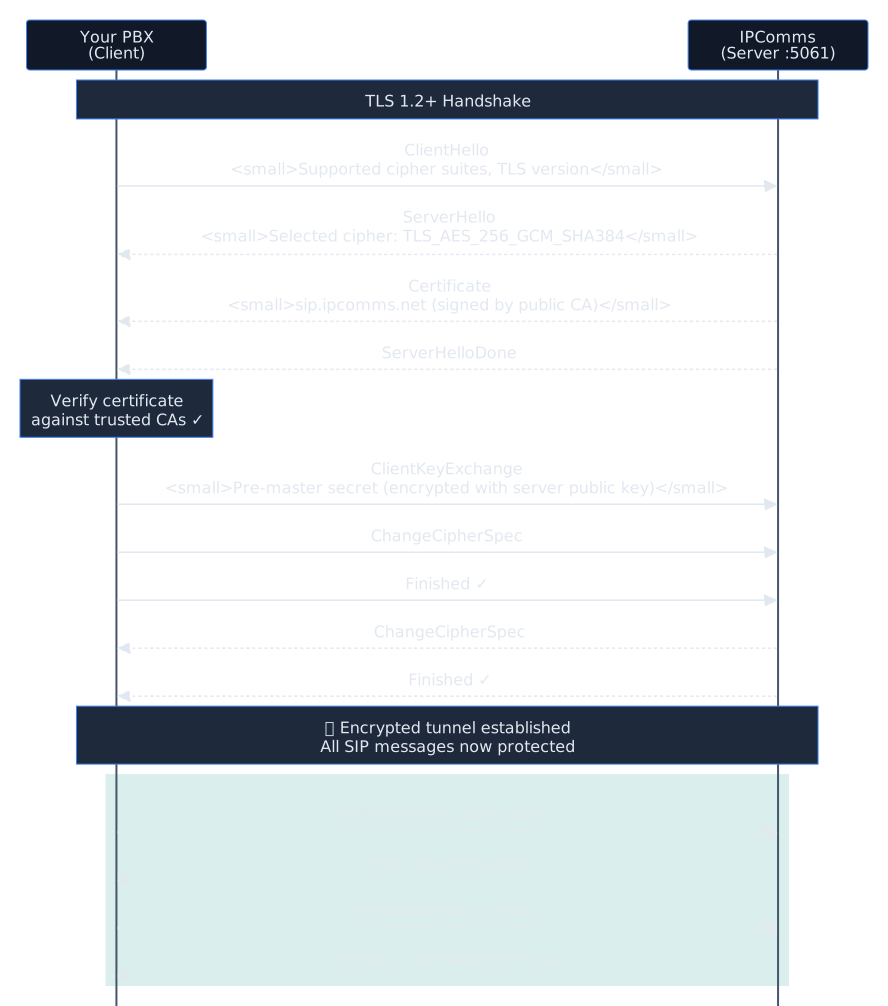
SIP over TLS (sometimes called SIPS) works by wrapping the standard SIP protocol inside a TLS-encrypted TCP connection, using port 5061 instead of the standard port 5060. The process follows the standard TLS handshake:
- TCP connection: Your PBX opens a TCP connection to the SIP provider on port 5061
- TLS handshake: Client and server exchange certificates and negotiate cipher suites (e.g., TLS_AES_256_GCM_SHA384)
- Certificate validation: Your PBX verifies the server certificate against trusted Certificate Authorities. Optionally, the server can also verify your client certificate (mutual TLS)
- Encrypted channel: All subsequent SIP messages flow through the encrypted tunnel — REGISTER, INVITE, BYE, and everything in between
Protocol Comparison
| Feature | SIP over UDP | SIP over TCP | SIP over TLS |
|---|---|---|---|
| Default Port | 5060 | 5060 | 5061 |
| Signaling Encryption | None | None | AES-256 |
| Auth Protection | MD5 hash only | MD5 hash only | Fully encrypted |
| Media Encryption | None (RTP) | None (RTP) | Requires SRTP |
| Certificate Required | No | No | Yes |
| Man-in-the-Middle | Vulnerable | Vulnerable | Protected |
TLS Version: Always use TLS 1.2 or higher. TLS 1.0 and 1.1 have known vulnerabilities and are deprecated. Asterisk’s PJSIP supports method=tlsv1_2 to enforce this minimum version.
TLS Handshake Sequence
How SRTP Works
SRTP (Secure Real-time Transport Protocol, defined in RFC 3711) encrypts the media portion of a VoIP call. While TLS protects the signaling, SRTP protects the actual audio content — the spoken words.
Key Exchange Methods
SDES (Session Description Protocol Security)
SRTP keys are exchanged in the SDP body of SIP messages (the a=crypto attribute). This is the most common method for SIP trunking and is what IPComms supports. Requires TLS to be secure — without TLS, the keys are sent in plain text.
DTLS-SRTP
Key exchange happens directly between media endpoints using DTLS (Datagram TLS). More secure since keys never appear in SIP signaling, but less commonly supported by SIP trunk providers. Used primarily in WebRTC.
Why TLS Alone Is Not Enough
SIP signaling and media travel on separate streams. TLS encrypts the SIP signaling (the control channel), but the actual audio data flows as RTP packets on different UDP ports (typically 10000–20000). Without SRTP, these audio packets are unencrypted even when signaling is protected by TLS.
Think of it this way: TLS encrypts the envelope (who is calling whom, from where), while SRTP encrypts the letter inside (what is being said). You need both for complete protection.
SDES + TLS = Secure: When using SDES key exchange (the standard for SIP trunking), TLS ensures the SRTP keys transmitted in the SDP are never exposed. This combination provides robust encryption for both signaling and media.
Compliance Use Cases
Voice encryption is not just a security best practice — for many industries, it is a regulatory requirement. Here are the major compliance frameworks that mandate or strongly recommend TLS/SRTP for voice communications.
HIPAA — Healthcare
The Health Insurance Portability and Accountability Act requires covered entities to implement technical safeguards for electronic Protected Health Information (ePHI). Voice calls discussing patient information, telehealth sessions, and recorded calls containing health data all fall under ePHI protection requirements.
- HIPAA Security Rule §164.312(e)(1): Implement technical security measures to guard against unauthorized access to ePHI being transmitted over electronic communications networks
- Encryption is “addressable” but failing to implement it requires documented justification and equivalent alternative measures
- Telehealth calls discussing diagnoses, prescriptions, or treatment plans must be encrypted in transit
CPNI — Telecommunications
Customer Proprietary Network Information (CPNI) rules under FCC 47 CFR Part 64 require telecommunications carriers to protect call detail records and customer usage data. SIP trunk providers and their customers share responsibility for protecting this data.
- Call Detail Records (CDRs) transmitted in SIP signaling headers are CPNI data
- Carrier obligations: Protect against unauthorized access to calling patterns, numbers called, and call duration
- TLS prevents interception of CDR data embedded in SIP INVITE and BYE messages
PCI-DSS — Payment Card Industry
PCI-DSS Requirement 4 mandates encryption of cardholder data in transit over open, public networks. Any organization that captures credit card numbers over the phone — whether through agent-assisted calls or IVR keypad entry — must encrypt those voice streams.
- Requirement 4.1: Use strong cryptography and security protocols to safeguard sensitive cardholder data during transmission over open, public networks
- DTMF tones carrying credit card numbers in IVR systems travel as RTP — SRTP encryption is required
- Call recordings containing card numbers must also be encrypted at rest and in transit
SOX / Financial Services
Sarbanes-Oxley and financial regulations require protection of material non-public information. Encrypted voice lines prevent interception of earnings discussions, M&A conversations, and insider information that could enable securities fraud.
Legal / Attorney-Client Privilege
Attorney-client privilege requires reasonable measures to maintain confidentiality. ABA Formal Opinion 477R states lawyers must make “reasonable efforts” to prevent unauthorized access to communications. Unencrypted VoIP may not meet this standard.
Do You Need Voice Encryption?

Compliance Requirements Matrix
| Framework | TLS Required? | SRTP Required? | Audit Trail? | Recording Encryption? |
|---|---|---|---|---|
| HIPAA | Addressable | Addressable | Yes | Yes |
| CPNI | Recommended | N/A | Yes | N/A |
| PCI-DSS | Required | Required | Yes | Yes |
| SOX | Recommended | Recommended | Yes | Yes |
| Legal/Privilege | Recommended | Recommended | Varies | If applicable |
TLS/SRTP vs VPN: Which Do You Need?
Both TLS/SRTP and VPN tunnels encrypt voice traffic, but they operate at different layers and serve different purposes. Here is how they compare.
| Feature | TLS/SRTP | VPN (IPsec/WireGuard) |
|---|---|---|
| Encryption scope | Per-call, per-stream | All traffic in tunnel |
| Network layer | Application (L7) | Network (L3) |
| NAT traversal | Native SIP NAT handling | Can complicate NAT |
| Latency overhead | Minimal | Additional encapsulation |
| Provider support | Standard SIP feature | Requires provider cooperation |
| Multi-site | Works anywhere | Needs VPN per site |
| Configuration | PBX settings only | Network infrastructure |
Recommendation: Use TLS/SRTP as the baseline for all SIP trunk connections. Add a VPN when you need to protect additional traffic (web management interfaces, provisioning) or when connecting remote offices over untrusted networks. For most SIP trunking scenarios, TLS/SRTP alone provides sufficient encryption.
Configuring Asterisk PJSIP with TLS & SRTP for IPComms
This section walks you through configuring Asterisk 18+ with PJSIP to connect to IPComms using TLS for signaling and SRTP for media encryption.
Network Architecture

Prerequisites: Asterisk 18 or later with PJSIP (not chan_sip), OpenSSL installed, and a valid TLS certificate. Let’s Encrypt works well for production; a self-signed certificate can be used for testing.
Step 1: Generate or Install TLS Certificates
You need a certificate and private key for Asterisk’s TLS transport. For production, use Let’s Encrypt:
Option A: Let’s Encrypt (production):
# Install certbot if not already present
apt install certbot

# Generate certificate for your PBX hostname
certbot certonly --standalone -d pbx.yourdomain.com

# Create symlinks for Asterisk
mkdir -p /etc/asterisk/keys
ln -s /etc/letsencrypt/live/pbx.yourdomain.com/fullchain.pem \
    /etc/asterisk/keys/asterisk.crt
ln -s /etc/letsencrypt/live/pbx.yourdomain.com/privkey.pem \
    /etc/asterisk/keys/asterisk.key

# Download the ISRG Root X1 CA bundle
wget -O /etc/asterisk/keys/ca.crt \
    https://letsencrypt.org/certs/isrgrootx1.pem
Option B: Self-signed (testing only):
# Generate self-signed certificate
openssl req -new -x509 -days 365 -nodes \
    -out /etc/asterisk/keys/asterisk.crt \
    -keyout /etc/asterisk/keys/asterisk.key \
    -subj "/CN=pbx.yourdomain.com"

# Copy cert as CA for self-signed
cp /etc/asterisk/keys/asterisk.crt /etc/asterisk/keys/ca.crt

# Set permissions
chown asterisk:asterisk /etc/asterisk/keys/*
chmod 640 /etc/asterisk/keys/*
Step 2: Configure PJSIP TLS Transport
Add a TLS transport to your /etc/asterisk/pjsip.conf:
; ============================================
; TLS Transport for encrypted SIP signaling
; ============================================

[transport-tls]
type=transport
protocol=tls
bind=0.0.0.0:5061
cert_file=/etc/asterisk/keys/asterisk.crt
priv_key_file=/etc/asterisk/keys/asterisk.key
ca_list_file=/etc/asterisk/keys/ca.crt
method=tlsv1_2
; Require TLS 1.2 minimum - do not use tlsv1 or sslv3
Step 3: Configure IPComms Trunk with TLS/SRTP
Configure the IPComms trunk endpoint, AOR, and authentication using the TLS transport:
; ============================================
; IPComms Trunk - TLS Signaling + SRTP Media
; ============================================

[ipcomms]
type=endpoint
transport=transport-tls
context=from-ipcomms
disallow=all
allow=ulaw
allow=alaw
outbound_auth=ipcomms-auth
aors=ipcomms
from_domain=sip.ipcomms.net
media_encryption=sdes
media_encryption_optimistic=yes
direct_media=no
trust_id_inbound=yes
send_rpid=yes
send_pai=yes

[ipcomms-auth]
type=auth
auth_type=userpass
username=YOUR_TRUNK_USERNAME
password=YOUR_TRUNK_PASSWORD

[ipcomms]
type=aor
contact=sips:sip.ipcomms.net:5061
qualify_frequency=60

[ipcomms-identify]
type=identify
endpoint=ipcomms
match=sip.ipcomms.net
Key Settings Explained:
transport=transport-tls— Uses the TLS transport defined in Step 2media_encryption=sdes— Enables SRTP with SDES key exchangemedia_encryption_optimistic=yes— Falls back to RTP if the remote end does not support SRTP (set tonoto enforce SRTP)contact=sips:— Thesips:URI scheme signals TLS is required
Step 4: Enable SRTP on Internal Extensions
For end-to-end encryption, your internal phones should also use TLS/SRTP. Add these settings to your extension endpoints:
; Secure endpoint template for internal phones
[endpoint-secure](!)
type=endpoint
transport=transport-tls
context=from-internal
disallow=all
allow=ulaw
allow=alaw
direct_media=no
media_encryption=sdes
media_encryption_optimistic=no
; Set to no to REQUIRE SRTP from all phones

; Example extension using secure template
[1001](endpoint-secure)
auth=1001-auth
aors=1001
callerid="John Smith" <1001>

[1001-auth]
type=auth
auth_type=userpass
username=1001
password=STRONG_RANDOM_PASSWORD_HERE

[1001]
type=aor
max_contacts=1
remove_existing=yes
Step 5: Dialplan Configuration
Configure your dialplan in /etc/asterisk/extensions.conf to route calls through the encrypted trunk:
; ============================================
; Outbound calls via encrypted IPComms trunk
; ============================================

[from-internal]
; US/Canada domestic - 10 or 11 digit
exten => _1NXXNXXXXXX,1,Dial(PJSIP/${EXTEN}@ipcomms,,b(add-headers^${EXTEN}^1))
exten => _NXXNXXXXXX,1,Dial(PJSIP/1${EXTEN}@ipcomms,,b(add-headers^1${EXTEN}^1))

; International
exten => _011.,1,Dial(PJSIP/${EXTEN}@ipcomms)

; Emergency
exten => 911,1,Dial(PJSIP/911@ipcomms)
exten => 933,1,Dial(PJSIP/933@ipcomms)

; ============================================
; Inbound calls from IPComms
; ============================================

[from-ipcomms]
exten => _X.,1,Goto(inbound-handler,${EXTEN},1)

[inbound-handler]
exten => _X.,1,Answer()
 same => n,Dial(PJSIP/1001&PJSIP/1002,30)
 same => n,Voicemail(1001,u)
 same => n,Hangup()
Step 6: Reload and Verify
Apply the configuration and verify TLS is working:
# Reload PJSIP configuration
asterisk -rx "module reload res_pjsip.so"

# Verify TLS transport is listening
asterisk -rx "pjsip show transports"

# Check that port 5061 is open
ss -tlnp | grep 5061

# Enable SIP debug logging to verify TLS handshake
asterisk -rx "pjsip set logger on"

# Make a test call, then check the logs for:
# - "Transport: TLS" in SIP messages
# - "a=crypto:" lines in SDP (SRTP negotiation)
IPComms TLS Endpoint: Connect to sip.ipcomms.net on port 5061 for TLS. The server presents a valid certificate signed by a public CA. No custom CA configuration is needed on your end if using the system CA bundle.
Testing Your Encrypted Connection
Verify TLS is Active
# Check that Asterisk is listening on TLS port
asterisk -rx "pjsip show transports"
# Look for: transport-tls  tls  0.0.0.0:5061

# Verify TLS connection to IPComms using openssl
openssl s_client -connect sip.ipcomms.net:5061 -brief
# Should show: CONNECTION ESTABLISHED
# Protocol: TLSv1.2 (or TLSv1.3)

# Check active channels for encryption
asterisk -rx "pjsip show channelstats"
Verify SRTP is Active
# Enable RTP debug during a test call
asterisk -rx "rtp set debug on"

# Make a call and look in the logs for:
# "SRTP" and "a=crypto:1 AES_CM_128_HMAC_SHA1_80"
# in the SDP negotiation

# Disable RTP debug when done
asterisk -rx "rtp set debug off"
Wireshark Verification
For thorough verification, capture packets with tcpdump and analyze in Wireshark:
# Capture SIP traffic on the TLS port
tcpdump -i eth0 -w /tmp/sip-tls-test.pcap port 5061

# Open in Wireshark - you should see:
# - TLS handshake packets (Client Hello, Server Hello)
# - Application Data packets (encrypted SIP - unreadable)
# - NO readable SIP INVITE or REGISTER messages
Success Indicators: If TLS is working correctly, Wireshark will show the SIP traffic as “TLS Application Data” — you will NOT be able to decode the SIP messages. If you can read the SIP INVITE in plain text, TLS is not active.
Common Issues & Troubleshooting
Certificate Errors / TLS Handshake Failure
If you see SSL routines:ssl3_get_server_certificate:certificate verify failed in the Asterisk log, your CA bundle is missing or incorrect. Ensure ca_list_file points to a valid CA bundle that includes the root CA for your provider’s certificate. For Let’s Encrypt, use the ISRG Root X1 certificate.
One-Way Audio or No Audio with SRTP
One-way audio after enabling SRTP usually means only one side is encrypting. Verify that media_encryption=sdes is set on both your trunk endpoint and the remote endpoint. If using media_encryption_optimistic=yes, the call may silently fall back to unencrypted RTP if the remote side does not support SRTP. Check rtp set debug on to confirm both sides are negotiating SRTP.
NAT Traversal Issues with TLS
TLS uses TCP, which can behave differently through NAT than UDP. Ensure your firewall allows outbound TCP connections on port 5061 and that return traffic is permitted. If behind a NAT, set local_net and external_media_address/external_signaling_address on your transport. Symmetric NAT can also cause issues with SRTP media — set rtp_symmetric=yes and force_rport=yes on your endpoint.
Codec Negotiation Failures
Some codecs may not be supported over SRTP. Stick with standard codecs (G.711 ulaw/alaw, G.729) that have well-tested SRTP support. If using Opus or other modern codecs, verify SRTP compatibility with your Asterisk version.
Certificate Renewal (Let’s Encrypt)
Let’s Encrypt certificates expire every 90 days. Set up a cron job to renew and reload Asterisk: certbot renew --deploy-hook "asterisk -rx 'module reload res_pjsip.so'". This ensures your TLS transport always has a valid certificate.
Implementation Checklist
Use this checklist to ensure your SIP TLS/SRTP implementation is complete:
Certificates
PJSIP Configuration
tlsv1_2 (minimum)transport=transport-tlsmedia_encryption=sdes enabled on trunksips: URI scheme for TLS enforcementInternal Phones
Network & Firewall
Verification
Secure Your Voice Communications with IPComms
IPComms supports TLS and SRTP on all SIP trunks at no additional cost. Get enterprise-grade encrypted voice with pay-as-you-go pricing starting at $0.01/min.